Dual Band WiFi Router Antenna | 2.4GHz/5GHz 2dBi Gain
Specifications
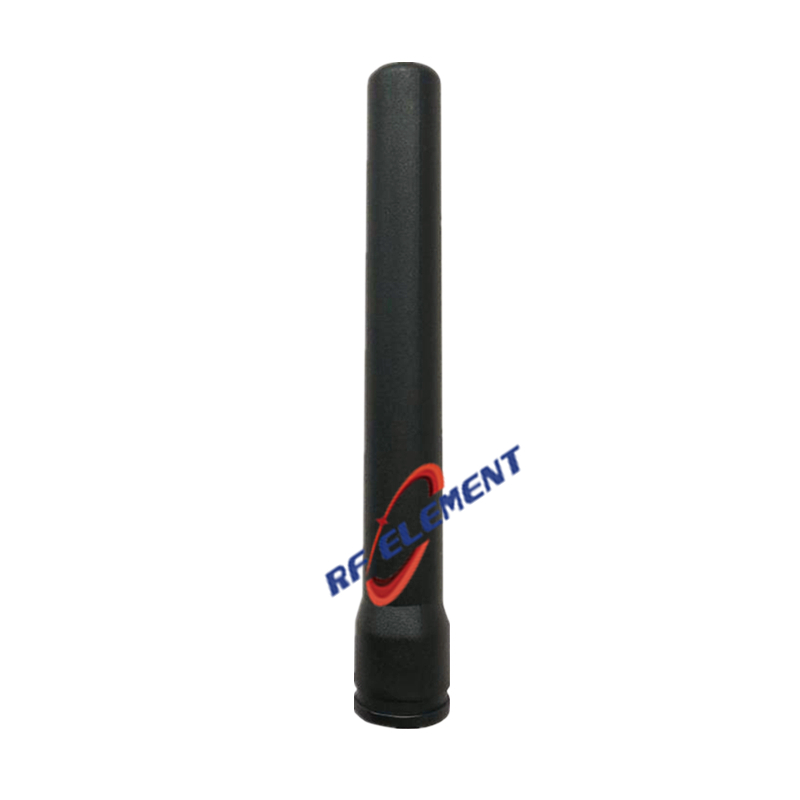
A 2 dBi dual band antenna on an 8 cm rod is not a small version of a site antenna, and treating it as one is how replacement orders go wrong. Its job is to sit directly on the back of an access point or a router, on an RP-SMA male connector, and to radiate at 2.4 and 5.8 GHz with a pattern close to that of a half wave dipole. That means the gain figure is not a performance claim to be compared with a 16 dBi sector; it is the honest number for a compact omni, and the specifications that actually decide the order are the connector gender, the 55 gram weight, the copper reflector and the VSWR of 2.0 that the design accepts on purpose.
What 8 cm of radiator can and cannot do at 2.4 and 5.8 GHz
At 2450 MHz the wavelength is 122 mm, so the 80 mm radiator is 0.65 of a wavelength. At 5800 MHz the wavelength is 52 mm, so the same rod is 1.55 wavelengths. The first case is a short dipole, which is why the 2.4 GHz gain is 2 dBi and the vertical beam is 65 degrees. The second is a little longer than a full wave, which is why the 5.8 GHz gain is 2.5 dBi and the beam narrows to 60 degrees. Both numbers are consistent with the physical length, and neither is inflated.
What the part cannot do is produce real directivity. A 78 degree vertical beam is what a plain dipole gives, and this product is a few degrees narrower than that because of the reflector behind it. Any claim of 5 dBi or more from an 8 cm stick at 2.4 GHz would require a beam of about 30 degrees, which cannot be formed in that length. The honest reading is that this is a compact omni with almost no gain, and it is bought for its size, its connector and its dual band coverage rather than for reach.
RP-SMA male is not SMA male, and that is the first thing to check
The connector is specified as RP-SMA male. Reverse polarity means the gender of the centre contact is swapped relative to the shell: an RP-SMA male has a socket in the middle where a standard SMA male has a pin. It threads onto an RP-SMA female jack, which is what most consumer access points and routers carry, and it will also thread onto a standard SMA female because the thread is the same. The centre contact then meets another socket instead of a pin, the link works intermittently or not at all, and the part comes back as faulty when the real problem is the gender.
The check takes ten seconds and saves a return: look into the connector on the radio. A small pin in the centre means standard SMA, a small hole means RP-SMA. Most enterprise access points use RP-SMA, most test equipment and cellular radios use standard SMA, and the two families look identical from the outside. This is the single most common reason a 55 gram part generates a shipping claim.
VSWR 2.0 is a design choice, not a defect
A VSWR of 2.0 is a reflection coefficient of 0.333, a return loss of 9.5 dB and a mismatch loss of 0.51 dB. Half a decibel is well inside the margin of any Wi-Fi link, which typically carries 20 to 30 dB of fade margin before the modulation drops. Tightening the match to 1.5 would require a longer radiator or a matching network that costs more than the part, and it would buy 0.33 dB. For the application the design is right, and a buyer who rejects it for the VSWR alone is optimising the wrong number.
The comparison that does matter is with the radio end. A 0.5 dB mismatch at the antenna is smaller than the 1 to 2 dB typically lost in the short pigtail inside the access point. If the link is marginal, the cable and the radio are where to look first.
| Frequency Range | 2400 – 2500 MHz | 5150 – 5850 MHz |
| Polarization | Vertical | |
| Gain(dBi) | 2dBi | 2.5dBi |
| Horizontal Beamwidth | 360° | |
| Vertical Beamwidth | 65° | 60° |
| Impedance | 50Ω | |
| VSWR | ≤ 2.0 | |
| Maximum Power | 50W | |
| Connector Type | 1 Port, RP-SMA Male | |
| Antenna Length(cm) | 8 | |
| Net Weight | 55g | |
| Operating Temperature | -55° to +60° C (-67° to +140° F) | |
| Reflector Material | Copper | |
| Radome Materila | Plastic(DSM CM600-V) | |
Copper reflector, ABS radome, 55 grams
The reflector is copper rather than plated steel, which matters for two reasons: copper keeps its conductivity at the joint after soldering, and it does not rust in a humid room. The radome is ABS in the DSM CM600-V grade, a named material rather than a generic plastic, which is more disclosure than most small antennas carry and tells a buyer what to expect from the moulding and the colour. The whole part weighs 55 grams, light enough that the connector and the radio housing carry it without a support.
At 8 cm long and 55 grams, this is also the part least likely to be damaged by an accidental knock, which is relevant in a room where the access point sits on a shelf rather than on a ceiling. For installations on a mast or a wall, the mechanical assumptions are different and a larger antenna is the right choice.
Where a 2 dBi replacement antenna is the right answer
The most common use is replacing a lost or broken stock antenna without changing the radio approval. A radio is certified with a specific antenna gain, and fitting a higher gain part raises the effective isotropic radiated power above the limit the certificate covers. Staying at 2 dBi keeps the installation inside the original approval, which is often the deciding factor for a deployment that has already passed compliance.
The second use is a short indoor link where the path is 10 to 30 metres and the limitation is the wall, not the antenna. Adding gain at one end of such a link moves the pattern rather than improving it, and a wider beam is more forgiving of where the other end actually sits. Where the run is longer or the link is outdoors, a sector or a panel is the right tool, and the dual band sector antenna covers both bands with 14 and 16 dBi. Where the equipment is a 5G router rather than a Wi-Fi access point, the 5G omni antenna uses the same mounting idea over 698 to 4200 MHz. The rest of the range is grouped on the dual band WiFi antenna page.
Send your requirement to sales@rfelement.com with a photo of the connector on the radio and the length of the existing antenna, and we will confirm the gender and the fit before the order is placed.
FAQ — Dual Band WiFi Router Antenna
What is the Dual Band WiFi Router Antenna used for?
What frequency band does the Dual Band WiFi Router Antenna cover?
What are the key specifications of the Dual Band WiFi Router Antenna?
Can RF element customize the Dual Band WiFi Router Antenna for my application?
What is the MOQ and lead time for the Dual Band WiFi Router Antenna?
How do I get a quotation for the Dual Band WiFi Router Antenna?